
Kurator · Research memory for MCP-connected LLMs
Turn browsing into a structured knowledge base your AI tools can actually use.
Kurator lets you decide how knowledge should be prepared before an AI assistant retrieves it. Your Kurator prompts structure each source for research, analysis, content creation, or publishing, and Claude, ChatGPT, Gemini, Grok, and other MCP-connected assistants answer from records built for that purpose.
↓ Watch a raw page become a recordFree to start · Chrome, Brave, Edge, Arc, Vivaldi, and other Chromium browsers
Evaluating AI-assisted data extraction in ecological evidence synthesis
A tab. Nothing here tells you why you opened it, what it argued,
or where it
belongs. Close it and it’s gone.
Evaluating AI-assisted data extraction in ecological evidence synthesis
Tags — you set these Description — written on savePrompt: Methodology, sample, limitationsMethod. Assessed AI-assisted extraction of 2,079 values across 189 peer-reviewed studies.
Result. 87.8% overall accuracy; under 3% error on categorical descriptors, but 20–30% of quantitative values required correction.
Limitation. Human validation remains necessary for quantitative synthesis.
You can spend an hour researching and come away with excellent sources — and then watch all of it vanish.
A closed tab.
A bookmark folder you will never reopen.
A chat history you would have to re-read to mine.
The problem was never finding information. It’s that nothing turns it into memory your AI can reuse — so every new chat starts from raw pages again.
Slop in → slop out
Your AI’s output is only as good as its input.
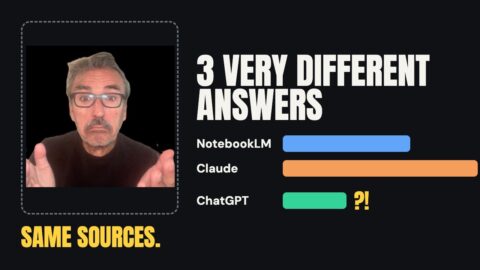
Martin Keen of IBM defines AI slop as text that’s formulaic, generic, error-prone and of little value. It starts with what the model is given. Hand an AI a raw page and it has to sort ads, filler and transcription errors while it answers, with no idea why you saved the page. Kurator fixes the input: sources you chose, shaped by your own prompt, each linked to the original so you can check the answer. We tested it three ways.
We built two notebooks from the same 128 AI Marketers Guild session videos: one uploaded directly, one synced from Kurator. Asked the same questions, the Kurator notebook named ten real platforms to the raw notebook’s four, grouped them by marketing discipline, and answered with action plans instead of an overview. The raw notebook kept more exact statistics, but repeated unvetted claims without question.
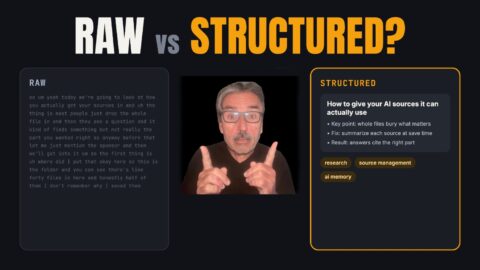
We clipped the same YouTube video twice. Obsidian’s Web Clipper saved it as raw Markdown: the full timestamped transcript. Kurator ran a custom prompt on it and saved ten topic chunks with the key quotes, facts and timestamps, in a file 38% smaller. Asked a question neither clip was built for, both gave the same answer. Only the transcript had one secondary quote word for word.
Not every AI assistant reads the same data the same way. We asked Gemini and ChatGPT the same question about one folder of Obsidian-versus-Kurator tests. Gemini broke it down as architecture: a feature matrix and a two-layer setup, with Obsidian for thinking and Kurator feeding your AI. ChatGPT broke it down as evidence: what the tests proved, what they didn’t, and why each source was saved. Two models, two lenses on the same research. Connect both and you see more than either shows alone.
How to beat AI slop: curate what goes in, shape it with your own prompt, and compare answers from more than one model. Those are the three tests above, and Kurator does all three from one library. Every record also links back to its source, so you can verify any claim before you put your name on it.

Capture → Structure → Reuse
Three steps, and only one of them is yours to do.
Kurator is a browser extension. You judge what’s worth keeping. It does everything that has to happen next for that judgment to become memory your AI can still use in six months.
Anything you can open, you can keep.
Click Kurator on any page and save it as a structured post, not a naked link. Selective by design: memory tools that capture everything spend their life cleaning up duplicates and contradictions. Your library starts high-signal because you chose what got in.
- Articles, blog posts, docs, and PDFs — the whole page, not a title and a URL.
- YouTube videos — with full transcripts and timestamps pulled in automatically.
- AI conversations and research sessions — the output survives the thread.
- Whole projects — organized into folders and nested collections from the start.






Every source lands in the same shape.
When you save, Kurator runs your prompt against the content and writes the description — not a generic summary, the exact output shape you defined. Twenty sources come back in one format instead of twenty, which is what makes them usable as memory.
- A prompt library, not a template file — write a prompt in AI Settings, name it, and pick which one runs on each save. Edit it once and every future save uses the new version.
- Provenance on every record — author, publisher, date and thesis travel with the content, so a vendor’s benchmark never passes as independent fact.
- Self-contained sections — long content is split by topic, so retrieval pulls the paragraph you need instead of the whole post.
- Clean long transcripts automatically: strip filler, fix names, section it, extract the recommendations.
You direct. AI does the structuring. Every item lands described, tagged, attributed and searchable — filterable by headline, description, author, publisher, or tag.

One record. Every destination.
Built-in AI memory stays locked inside one assistant. Your Kurator library doesn’t. Curate once, and every tool you use reads the same structured record.
Connect Claude, ChatGPT, Gemini or Grok, one or several. Each can search, read and write to your folders, run your prompts and file new findings. Ask two of them the same question of the same folder and see where their answers differ.
Filter a folder by tag, author or publisher, export just those records as a file, and upload it to whichever model you’re analyzing with.
Sync selected folders as sources. Edit and re-curate in Kurator and your notebook stays current — you keep editorial control over what goes in.
Turn any set of folders into KChat’s knowledge base. It answers only from what you trusted enough to save, with a link back to the source, for you or for your site’s visitors. Clean, pre-chunked records in means fewer made-up answers out.
Publish a collection to WordPress with KBucket or into a site you built with Lovable-style tools. Each post gets its own server-rendered page, transcript and all — visible to search engines and AI answer engines.




Who this is for
For people whose name goes on the work.
When AI does the producing, your judgment is the job. Kurator keeps that judgment attached to every source, so the work stays yours.
Content marketers and creators
Also: curators, publishers, community operators
Draft from sources you picked, read the way you read them, instead of a summary of the internet. One save becomes a post, a page on your site and an answer from your chatbot. “Give your community a reason to come back.”
AuthorityA point of view backed by real sources, in a feed full of AI slop.
Researchers
Also: academic, product and UX researchers, NotebookLM users
Every AI answer points back to a source you saved, so you check the claim instead of re-reading the paper. Papers, gray literature and transcripts land described, cited and filed. “Always manually verify your final citation list.”
CredibilityUse AI at full speed and still defend every claim.
Analysts and consultants
Also: strategists, competitive and market intelligence
The client, the project and the question travel with every source. Filter a folder, ask Claude, ChatGPT and Gemini the same question on the same evidence, and see where they disagree. “Stop wasting research.”
DefensibilityA recommendation you can trace when someone asks why.
Building a second brain or agent memory? Kurator is the source layer. Every record arrives structured and attributed, in folders any MCP-connected assistant can read. “Getting external web research into that local workspace remains a high-friction process.”
Your own media center
Your sessions end. Your content doesn’t have to.
You put hours into your podcast, webinars and community forums, and every session produces great material. Once it’s over, almost nobody goes back to it, because finding the part they need is too hard.
Your listeners and subscribers would reuse and reference it if it were easy to reach. Kurator turns your content into a gallery on your website, with a transcript and headlines for every session, and KChat to answer questions across the whole archive. People find what they’re looking for, share it, and help your community grow.
The AI Marketers Guild runs one today. After each weekly session, adding the video and running one prompt takes under a minute.
Kurator as your second brain
A second brain without the setup project.
No plugins to install, no templates to wire together, no vault to keep in sync. Install the extension, connect your AI and start saving. Kurator files every source where you’ll look for it, and your AI can reach all of it from any device.
Simple from the first save
One browser extension and one hosted connector. Your prompts live in a library you pick from on each save, so changing how sources get written up is an edit, not a rebuild.
Folders by purpose, not one raw pile
Research, product notes, prospects and AI chats each get their own folder. A task reads only the folders it needs, so your AI spends fewer tokens and stays on topic.
Structured descriptions plus your own tags
Your prompt gives every description the same sections. Your tags add what the page never says: the client, the project, the idea it belongs to. Find anything by folder, tag, author or publisher, and your tags draw Kurator’s knowledge map.
Your rules live in the cloud
The instruction files your AI reads first, from WIKI.md to your skills and lessons, are Kurator records, not files on one computer. Claude, ChatGPT, Gemini and Grok reach them from your desk, the web or your phone.
“Use Kurator to brief me on everything tagged NotebookLM in Product Research.”
What people say
Curators who stopped losing their research.
Reviews from Kurator and Content Hub users.
I find Kurator to be an incredibly valuable and useful tool in spotting themes and curating findings for my publications. Kurator helps me organize the flux of newsletters, white papers and articles I read daily and organize them thematically, with sourcing — a must for a researcher.
 by Idil Miriam Cakim
Perfect to organize stuff, even better at sharing it, and now even in French (localized version)! The tool I miss all these years, and the team behind the tool is also very helpfull. Good pick.
 by Bert
Loving the tool. A much more clever way to bookmark sites (with the possibility to add tags and descriptions). On top of that, it is wonderful to create a curated news channel on any subject you love. Loving it.
 by Stephane Feyens
First of all, I like its design for collecting and annotating the web information. And most importantly, I like its curation method.
You can use WordPress plugin to publish your collected information. I personally prefer its embed function because it’s more flexible for virtually any website.
So far, I’m satisfied with its information collection capabilities. And Chinese localization means I can now publish in my native language
The developers were responsive to my feedback and promptly began making improvements.
 by Charles Chang
It is with great enthusiasm that I share my experience with the Kurator app, which has surpassed my expectations by offering a robust platform and invaluable resources for advanced data analytics.
Our team, boasting 40 years of expertise in CPG syndicated data analytics and specializing in product development for targeted regional ROI and actionable insights, can attest to the significant impact Kurator has had on our workflow.
 by William Moore
I’d been looking for an aggregator plugin for a site I’d been wanting to start, and this one did the trick. It’s easy to set up, and if you run into trouble, the author is available and very willing to assist.
 by Bob Sawyer
Brilliant tool with many applications: We all live in a world with too much information to process – and it’s only going to get worse! Kurator is a beautifully simple solution to aggregating and curating info. I ran into an issue and Karan was immediately on it and followed up until resolved. Great support for a great product should rate 10 tacos (5 each!). I wish Karan the best.
 by John Frydman
 by Randeep Sudan
Karan offers constant improvements on a very good product. You cannot go wrong with this purchase if you intend and need to aggregate any content and publish/share it.
One thing missing – but Karan said it is possible – is a widget to display the RSS (a third-party RSS reader is for now needed to do so). I would personally prefer to have a way to display a collection on my membership site without the use of another product..like Powr, etc.
That said, you can simply share your collection with anyone by adding their emails (students, teammates, etc.).
Overall this is clearly worth the money!
 by Bogdan Heretoiu
We are an elite retirement planning consultancy. Being a trusted source for our prospects and clients is part of our value proposition. A library of curated content readily searchable that is based on third-party articles that we have assessed for accuracy and effectiveness in communication is an important component of being a dependable advisor. We use the KBucket content hub and Kurator to gather, curate, organize and distribute these articles in a simple manner that is both attractive and engaging for our visitors and staff.
 by Addie George
I’m a US immigration attorney that utilizes Kurator and KBucket to turbocharge my social media content distribution. I curate, comment, and instantly categorize new immigration-related news once, then share it across several platforms. The news I compile also aids me in my profession since all of the material is immediately available and indexable.
 by John Manley
I teach cybersecurity courses at Syracuse University, and I was seeking a method to better manage our resource library. The fact is that there is so much great information and resources that should be shared and is usually lost when students move on and new students come in. Kurator is a great tool to help us build a resource library.
 by Bahram Attaie
At “Show me Victories” we provide strategic communication to our clients. As part of our service, it is essential that we thoroughly research our subjects to gain insight into our strategy for communication. We have been using Kurator for a few months now and it has proven to be a huge time saver over previous methods and tools. I have saved 5 hours a week, curating, organizing, and sharing my research with my team.
 By Bryce Summary P.H.D
A Game Changer for both individuals and companies
I should add that I’ve been a long-time user of Optimal Access curation tools, and our firm has utilized them for several years as a method to simplify access to information for various departments in our organization. We discovered that our employees were able to use the Intranet more efficiently and that customized access to information for certain groups aided their co-workers in training new workers.
 By Geoff Tothill
I used Kurator to research information about a Machine Learning subject. I would say the product is user-friendly. I really like how it auto-populates the field before saving. I like that you can share your research with other people on KBucket. Also if more people upload their files and folders I would consider checking them out before starting my own research.
 By Yasmin Sahaf
Exactly What I’ve Been Looking For!!!!!
As a researcher, the extension is really helpful for me and I just loved it. I’d recommended the extension to anyone. Thanks
 By Goutom Kumer
Why capture happens in your browser
Your browser gets in. Scrapers don’t.
Every other tool that ingests a URL sends a server to fetch it — and servers get turned away. Kurator reads the page you already have open, logged in, rendered, exactly as you see it. The sources other tools can’t reach are the ones you get to keep.
Pricing · Three tools, one workflow
Start free. Pay when the library starts paying you back.
Every plan is month-to-month or yearly, and every product has a free tier you can use for as long as you like.
The browser extension that captures and structures.
Kurator Free
Chromium extension
No card required
- 100 posts
- Unlimited folders
- Shared folders
- One KBucket export file
- One sync folder / embed widget
- 200 widget views per month
Kurator Standard
Chromium extension
per month, billed monthly or yearly
- Unlimited links and folders
- Shared folders
- 1 export file
- 3 publish collections
- 5,000 widget views per month
Kurator Pro
Chromium extension
per month, billed monthly or yearly
- Unlimited links and folders
- Shared folders
- 10 export files
- 100 publish collections
- 50,000 widget views per month
Kurator Agency
Chromium extension
per month, billed monthly or yearly
- Unlimited links and folders
- Shared folders
- unlimited export files
- unlimited publish collections
- Unlimited widget views
The assistant grounded in what you curated.
KChat Free
Source-grounded assistant
Log in with your Kurator ID
- One chatbot
- 20 responses
- 2 retrains
- Custom prompts
- Choice of LLM
- Analytics and chat logs
- Leads list
KChat Basic
Source-grounded assistant
per month
- 1 chatbot
- 2,000 responses
- 20 retrains
- Custom prompts
- Choice of LLM
- Analytics and chat logs
- Leads list
KChat Standard
Source-grounded assistant
per month
- 3 chatbots
- 10,000 responses
- 60 retrains
- Custom prompts
- Choice of LLM
- Analytics and chat logs
- Leads list
KChat Premium
Source-grounded assistant
per month
- 5 chatbots
- 20,000 responses
- 100 retrains
- Custom prompts
- Choice of LLM
- Analytics and chat logs
- Leads list
The WordPress plugin that publishes it.
KBucket Free
WordPress plugin
Free to install and use
- Dedicated media library
- Plays YouTube on the page
- Shortcodes for embedding anywhere
- Custom CSS for look and feel
- A unique URL per post, driving traffic back to your site
- Landing page for KChat
- Custom ad banner per post
- Syncs automatically with Kurator
Upgrade from inside the app: open the Account menu at the top left of Kurator and click Upgrade. KChat uses the same Kurator ID.
Questions
Before you add Kurator.
What is Kurator, and how is it different from a bookmark manager?
Kurator is an orchestration layer for AI research. When you save a page, one of your own prompts runs right then and writes a structured description for the use you have in mind, such as an outreach brief, a transcript, or a competitive summary. You decide what matters, and Kurator records that decision. A bookmark manager gives you back a link. Kurator gives you research that your AI tools can use again.
Claude, ChatGPT and Gemini already have memory. Why do I need Kurator?
Built-in memory remembers things about you, not your research. It also stays inside one assistant. That is why people re-upload the same files into every new thread and re-explain context every time they switch tools. Kurator keeps your research library outside any single assistant, so it is available in Claude, ChatGPT, Gemini, Grok, NotebookLM, on your website, and in whatever tool you use next.
How is this different from AI memory tools and self-building knowledge bases?
Most memory tools save everything automatically and keep it inside their own app. Wiki-style systems rewrite their notes as new material comes in. Kurator is a library you curate: you choose what goes in, your own prompt structures it, and you can see and filter everything by folder, tag, author or publisher. The same folders then work in any MCP-connected assistant, NotebookLM, KChat and on your website, so your memory is not tied to one tool.
I use Obsidian. Do I need Kurator?
Obsidian Web Clipper can also run a prompt when you save a page, so capture alone isn’t the difference. The difference is what you can do afterward. Kurator keeps your prompts in one library you pick from on each save. Your folders are organized and filterable, so you can see what’s there at a glance. You can filter a folder and export it as a file for any LLM, connect the same library to Claude, ChatGPT, Gemini and Grok without running a local server, and publish it to your website or a KChat assistant. Obsidian remains a great place for your own writing; Kurator is where your sources go to work.
I already use NotebookLM (now Gemini Notebook). Why add Kurator?
NotebookLM does its best work when the sources you give it are good. The usual complaints are imports that sometimes fail, the 50-source limit, no folders or bulk management, answers that cite only a few of your sources, and notes that are hard to export. Kurator prepares sources before they reach NotebookLM. In our own test, a directly uploaded workshop video came back as an unpunctuated wall of text with misspelled names. The Kurator version had speaker labels, timestamps, and correct names.
Which AI assistants does Kurator work with?
Claude, ChatGPT, Gemini and Grok, with more to come. You add Kurator’s Cloud MCP connector to any of them as a custom connector. Each assistant can then search your library, read the descriptions you’ve saved, and save new sources into your folders with your prompts and tags. Because they all read the same folders, you can run the same analysis in two of them and compare the answers, a quick way to test an assumption before you rely on it.
What can I save?
You can save anything your browser can display, including pages behind a login. That covers articles, LinkedIn posts, Reddit threads with their comments, YouTube videos (with transcripts), PDFs, and your own AI conversations from Claude, ChatGPT, or Gemini. Each saved chat is a snapshot you can re-save after you ask follow-up questions.
Where is my data stored, and what does it cost?
Your library is stored in the cloud, which is what lets it sync and connect to your AI assistants. Prompts run with your own Gemini or OpenAI API key, which you add in AI Settings. You can export everything as JSON or XML at any time. Kurator is free for up to 100 links, and paid plans start at $4.99/month.
Your judgment, on the record
Use AI at full speed. Keep your name on the work.
Add Kurator, save the sources you’d stand behind, and let every AI assistant you use work from those instead of raw pages.
Research with AI. Save it to Kurator. Structure it once. Reuse it everywhere.
Contact · Customer relations matters to us
Talk to a person about your workflow.
Tell us what you’re trying to build and which product it touches. If it’s faster to show you, we’ll get on a call.
- Watch first. Our video tutorials live on the content hub.
- Ask KChat. The assistant in the corner of the site answers from our own documentation.
- Read the docs. Setup, prompts, publishing — step by step.
- Email us directly. [email protected]
I am required to track the latest developments in national digital policies and strategies. I am very impressed with the capabilities of Kurator and KBucket for capturing and publishing content. I now use Pagescreen to track important websites and capture publication/research links using Kurator. These links can then be published using KBucket on WordPress. Kurator with Pagescreen has been a game-changer for me. I wish Karan the best for the significant enhancements in the pipeline that should take Kurator to an entirely new level.